Virtual TimeClock
Employee Time Clock Software for Mac & Windows
Replace manual timesheets, hardware clocks, or expensive subscriptions with reliable desktop software. Track hours accurately, simplify payroll, without subscription fees.
Manual timekeeping is error-prone and labor-intensive. Virtual TimeClock provides a more reliable, easy-to-set-up, one-time cost solution.
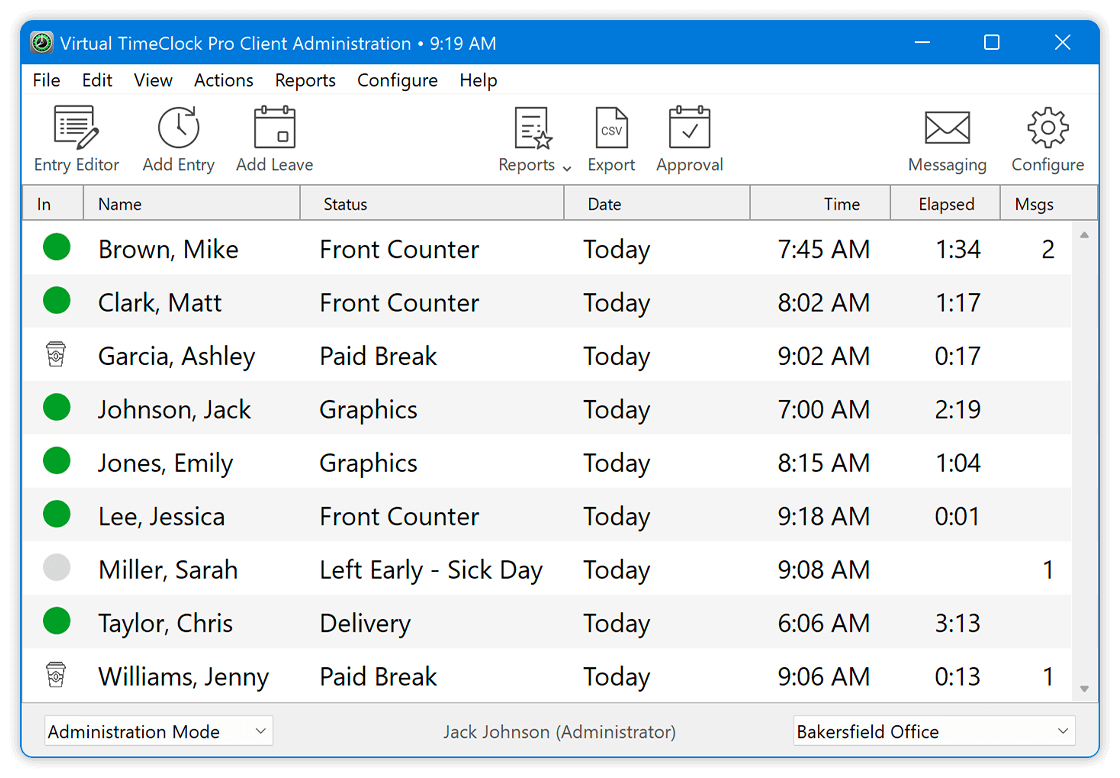
Employees clock in and out while hours are captured automatically; no manual tracking or calculations needed.
Accurate Time TrackingManagers review employee hours, fix missed punches, and approve accurate timecards in just minutes.
Timecards SimplifiedPrint or export payroll-ready hours instantly, so you can run payroll with accurate, ready-to-use data.
Payroll IntegrationsEasily track employee time off accruals, hours and current balances.
Purchase your time clock software once and it's yours to use forever.
Control time theft to ensure timecard accuracy and payroll integrity.
Empower workers with secure access to reduce administrative burden.
Ensure worker compliance with you company break and lunch policies.
Powerful rules automatically tracks overtime and prevents unauthorized hours.
Whether you’re managing a small team or a multi-location workforce, Virtual TimeClock provides an edition that scales with the way you track time every day.
Compare Virtual TimeClock EditionsSimple time clock to track hours for up to 3 employees.
Advanced time tracking for all your employees on one central computer.
Flexible multi-device time tracking across computers and locations.
Virtual TimeClock is designed to work alongside your favorite payroll provider. By moving away from manual data entry, businesses maintain their existing payroll workflow while gaining the benefit of 100% accurate timecard exports.
Explore Payroll Integrations
SurePayroll
ADP
PayChex
Account Edge
CheckMark
QuickBooks
PayChoice
Gusto
Paylocity
Start a no-risk free trial and see how easy it is to track employee hours, streamline payroll, and enjoy the long-term value of a simple one-time purchase.
Fully featured and supported.
Not time-limited, allows 300 punches.
No obligation, no credit card required.
Enjoy full access with a simple one-time purchase—no monthly or per-user fees, just long-term value and complete control of your time tracking data. Unlike subscription-based systems, you own your license and keep your data securely on your own computers.
Purchase Virtual TimeClock$195 one-time
$295 one-time
From $495 one-time
For over 30 years, we’ve helped businesses simplify their workplace time tracking. Our California-based support team is here to answer your questions, demonstrate features, or help you install and set up a no-risk free trial.
Real-world results from businesses improving accuracy & efficiency while cutting costs.
“Great Timeclock. I love how easy this is for my employees to use. As a manufacturer, people are spread out and this keeps things simple. t’s been great. This is close to 10 yrs with this software and I have no thoughts of changing.”
Suzanne P.
Business Supplies, 11-50 employees
Explore common questions about tracking employee hours with Virtual TimeClock.
No. Virtual TimeClock is a one-time purchase, not a subscription. You pay once for the software and own it permanently—there are no monthly or annual fees required to continue using it. You can learn more about how licensing works on our Licensing Overview page.
Yes. Virtual TimeClock is designed to run on both Mac and Windows computers, allowing you to use it in mixed-device environments without compatibility issues.
The Basic edition is designed for a single computer and simple time tracking for up to three employees. The Pro edition includes all Basic features plus more advanced tracking and reporting, and supports an unlimited number of employees. The Network edition includes all Pro features and is designed for multi-user environments, allowing employees to clock in from multiple computers connected to the same system. See our Compare Virtual TimeClock Editions page for a detailed list of features and functions.
Yes. With the Network edition, employees can clock in from multiple computers connected to the TimeClock, making it ideal for offices, shops, and distributed workstations.
Yes. Virtual TimeClock allows you to export employee time data in formats that work with most major payroll systems, helping reduce manual entry and streamline payroll processing. See our Virtual TimeClock Integrations page for details about all available integrations.
All trademarks, registered trademarks, and service marks of the above-mentioned payroll providers belong to their respective holders. Redcort Software Inc. is not affiliated with them in any way.