Apple Support Ending for Intel-Based Apps Warning
After upgrading to macOS Tahoe 26.4, some Virtual TimeClock users may see the following warning:
Support Ending for Intel-based Apps
This version of “Virtual TimeClock” will not open in a future release of macOS.
This warning appears when macOS detects an older Intel-based Mac app running on an Apple silicon Mac using Rosetta 2. It does not mean Virtual TimeClock has stopped working today. It means the installed version of Virtual TimeClock will need to be updated before upgrading to a future version of macOS that no longer includes Rosetta support.
Apple Silicon and Intel-Based Apps
Several years ago, Apple began transitioning Mac computers from Intel processors to Apple silicon. To help customers and developers through the transition, Apple included a compatibility technology called Rosetta 2, which allows many Intel-based Mac apps to continue running on newer Apple silicon Macs.
Rosetta 2 gave users time to keep using familiar software while developers updated their apps to run natively on Apple silicon. Apple has now announced that Rosetta support will end after macOS 27, which means older Intel-only apps are expected to stop opening in macOS 28.
The warning in macOS Tahoe 26.4 is intended to give users advance notice so they can update important apps before that future macOS upgrade.
Virtual TimeClock and Apple Silicon
Virtual TimeClock 23 was updated and recompiled to run natively on Apple silicon. That means Virtual TimeClock releases from 2023 and later run natively on Apple silicon Macs and should not display this warning.
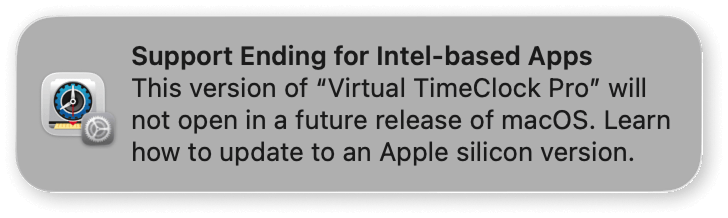 This warning is generally seen by customers running Virtual TimeClock 22 or older on an Apple silicon Mac.
Options for Customers Using Virtual TimeClock 22 or Older
If you are using Virtual TimeClock 22 or an earlier release, you have two options before macOS 28 arrives.
Option 1: Stay on Your Current macOS Version
If you do not upgrade your Mac to macOS 28, your current Virtual TimeClock installation is not affected by this Apple change. You can continue using Virtual TimeClock 22 or older on Macs running supported versions of macOS that still allow Intel-based apps to run.
Option 2: Upgrade Virtual TimeClock
You can upgrade Virtual TimeClock to the latest release, which runs natively on Apple silicon Macs. Upgrading is simple and straightforward, and our California-based support team is available to help make the process quick and easy.
Customers enrolled in Premier Support can upgrade to the latest release of Virtual TimeClock at no charge. Customers who are not currently enrolled can still upgrade their Virtual TimeClock software and may save up to 30% on the latest release.
Have Questions or Need Help?
We’re happy to answer questions, review your support plan, or help you explore your Virtual TimeClock upgrade options.
If you are seeing the “Support Ending for Intel-based Apps” warning, please contact Redcort Support and we’ll help you determine the best next step for your Mac and your Virtual TimeClock installation.